Database Monitoring Utility Overview
DTM DB Event is a database monitoring and management tool. This utility allows the user to define a few situations (events). For each event, the user can define what the program should do if the event occurs. The program helps the database administrator to perform continuously database supervising. Also, if critical events are occurring, DTM DB Event can make required actions automatically. E.g. if the database server is not available, the tool will execute an external program for notification message (alert) sending. It helps the company to protect database or minimize downtime.
Download free demo version
Key Features
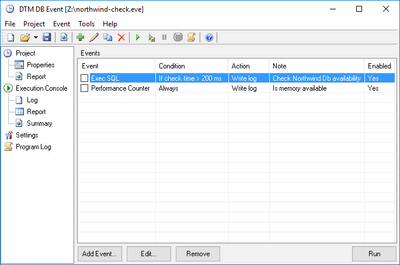
- Five condition types and four action types make this monitoring software powerful and flexible.
- Common and custom execution logs together with detailed reports help to monitor server or application availability and performance.
- Detailed project report allows users to review events set. Sample project report.
- Execution console helps DBA to supervise databases and server in visual style.
- The cumulative execution report with detailed statistics. Sample summary report.
- Database independent. You can watch for Microsoft SQL Server database as well as for DB2 or for MySQL. The software product supports all unified database interfaces (ODBC, IDAPI, OLE DB) and Oracle Call Interface.
- DTM DB Event is a utility that supports Windows XP/Vista/7, Windows 8/10 (desktop), Server 2003/2008/2012/2016.
Why DTM DB Event
- Console mode for unattended database monitoring.
- Easy to learn and to use. The program creates and manages supplemental event's options automatically.
- Flexible and customizable.
- The monitoring tool supports performance counters for local or remote windows system.
- Designed to work in a complex multi-server and multi-database environment.
See Also
- How does the event work?
- Who need database monitoring tool?